
Datafeed Setup | Adding AMP North Adviser Mapping
Advisers wishing to register for the AMP North datafeed please follow the process below: Adviser Registration - North Online Portal Process
Step 1: Log in to North Online with UserID and Password
Step 2: Navigate to Reporting> Financial Planning downloads
Step 3: Tick the Register for data selection box
Step 4: Select the Data option and hit "Submit"
Step 5: Accept the Terms and Conditions
You should receive a message saying you have successfully registered for financial planning downloads. If you need further assistance please contact North Service Centre on 1800 667 841 or via email to north@amp.com.au
Updating on Xplan
To use the initial balance feature, Navigate to the  button > Integration > System Datafeeds
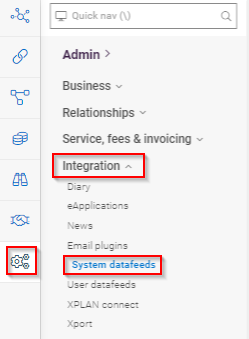
From System Datafeeds page, click Mappings > Advisers
The 'User' that the Adviser Mapping is added against will be the 'Vendor Adviser, it is best practice that the user selected is the 'Client Adviser' in Xplan.
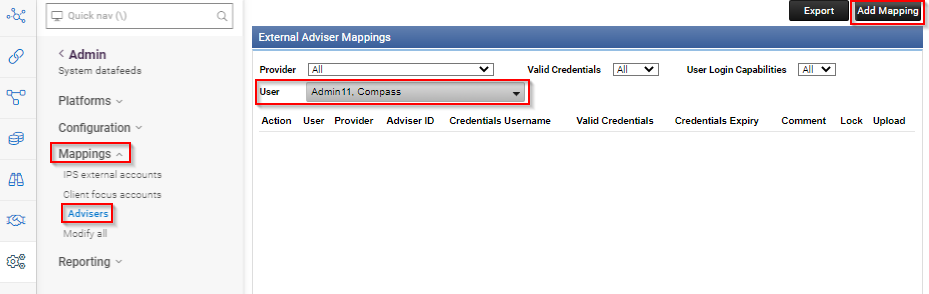
When the correct user is selected, click Add Mapping.
Select AMP North as the Provider,
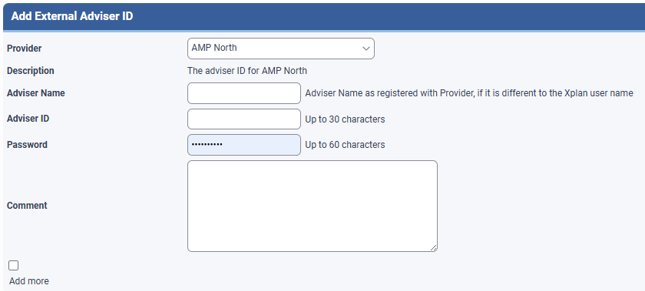
Adviser Name (Adviser Name as registered with Provider, if it is different to the Xplan user name)
Enter Adviser ID & password
Enter a comment with you name, date added, this will be useful for troubleshooting at a later date.
Click
The datafeed will appear as a line item under the user it was added against, the new/updated adviser mapping can take 24-48 hours to register with IressNet