
Xplan Contribution Summary
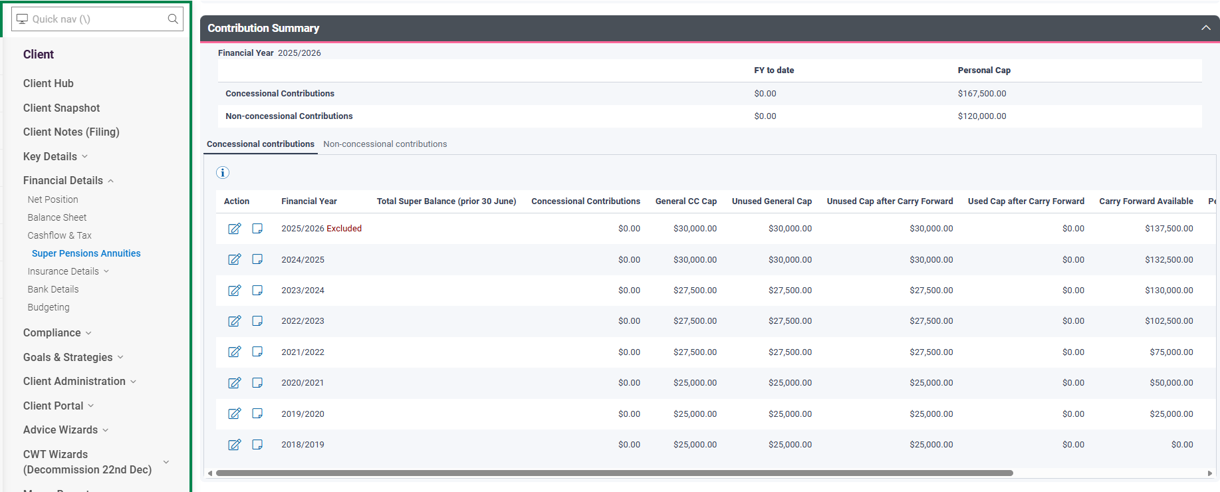
The Contribution Summary in Xplan provides a single, reliable location to review a client’s concessional and non‑concessional super contributions across multiple financial years. Recent enhancements make contribution tracking faster, clearer and more accurate — and now allow direct import into Xtools+
What the Contribution Summary Does
- Shows all concessional (CC) and non‑concessional (NCC) contributions from 2018/19 onwards.
- Automatically calculates:
- Personal Concessional Cap (carry‑forward applied)
- Personal Non‑Concessional Cap (bring‑forward applied)
- Excess and refunded contributions
- Bring‑forward status and year
- Supports either detailed contribution entry or high‑level annual totals.
- Allows file notes and documentation to be attached per financial year.
- Requires Total Super Balance (TSB) entry to enable accurate calculations and import to Xtools+.
Key Features Advisers Will Value
Automated Cap Calculations
Xplan automatically applies concessional and non‑concessional cap rules using the same legislative engine as Xtools, removing the need for spreadsheets and manual calculations.
Clearer Layout
The Summary is now presented in two separate tabs — Concessional and Non‑Concessional — each showing transparent breakdowns of how caps and entitlements are calculated.
Adviser‑Centric Workflow
- Quick annual data entry options
- Override values when required
- File notes and evidence stored with each year for audit purposes
Import Directly into Xtools+ (From 15 January 2026)
Important Note
Please update the Contribution Summary (including the Total Super Balance) before using the Xtools Import Wizard. Super contribution data can now be imported into Xtools+, Optimiser, Retirement Funding, TTRAP and Lifestyle Goals.
You must enter at least one TSB value into each Contribution Summary to activate Xtools import. Entering the TSB in Client Focus confirms you have access to the Contribution Summary element and validates the data before it is imported.
You can now import Contribution Summary data directly into Xtools+, including:
- Total Super Balance (TSB)
- Used and unused concessional caps
- Non‑concessional contribution history
- Bring‑forward status
Imported data is applied as at the start of the current financial year, providing clean and reliable modelling inputs. This directly supports:
- Contribution strategy optimisation
- Carry‑forward utilisation
- Retirement modelling and cashflow projections
- Bring‑forward NCC strategies
- Total Balance Cap‑related planning