
How do I delete a client?
Note: While users do have the ability to delete clients, we strongly recommend that you simply update the Entity Status & Category to Archived, as if a live client is accidently deleted, file note attachments may not be recoverable.
1. Navigate to the Key Details > General page of a client record.
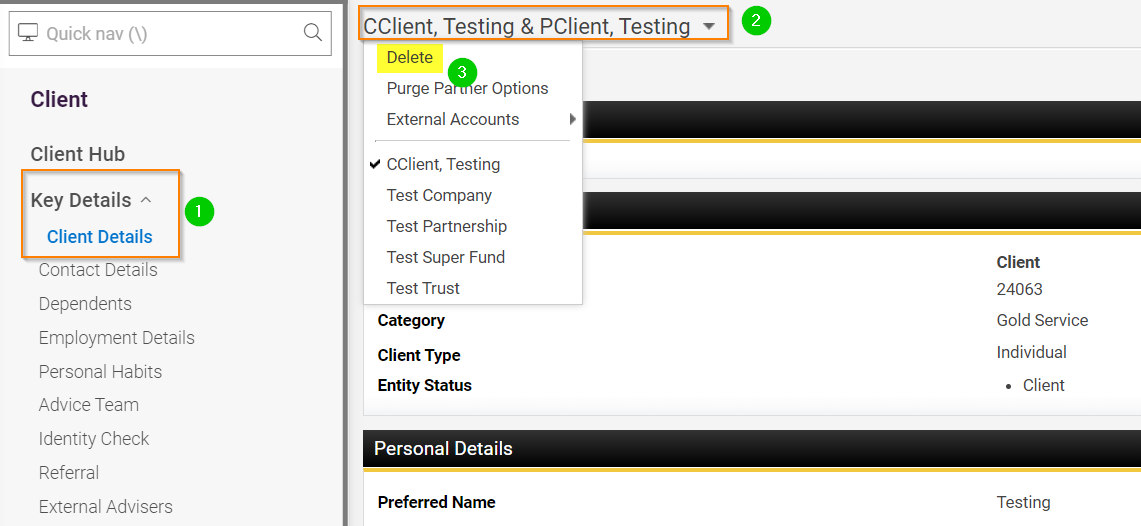
2. Click on the Name at the top of the page
3. Select Delete
4. You will then be prompted with a final check/warning, click Yes to proceed

This will only delete the main client record, you will need to repeat steps 1-4 for the partner record if necessary.
Tips: If deleting a duplicate client record, ensure that the record you are going to delete does not have any client data you need, including datafeeds, attached to it. (You can check for datafeeds under Portfolios > Admin > External Accounts and remap an account if needed)
All clients are soft deleted (assuming your site administrator has not changed this setting so that clients are permanently deleted immediately). If you delete a client in error, you or someone with sufficient capabilities will be able to locate and reinstate the client for the Deletion Log.